// Travel app UI
Travel Scrapbook Collage App UI Design in Expo
This travel collage app UI turns a trip into a scrapbook. A tall neon cover introduces the journey, then the collage board scatters photos, notes and stickers across a plum background.
- Screens
- 2
- Built with
- Expo SDK 58
- Fonts
- Inter, Playfair Display
- License
- Free (MIT)
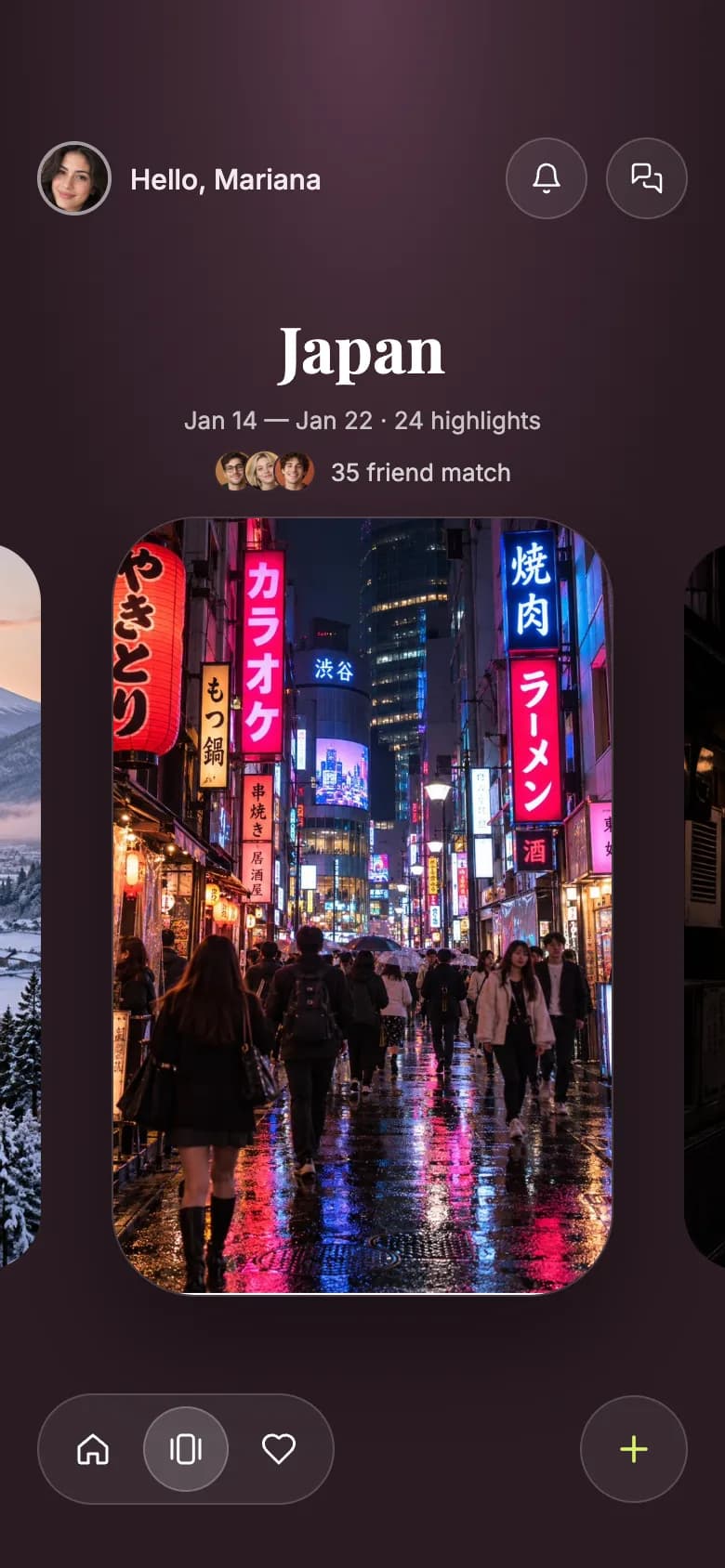
Japan Trip Collage app screens
Trip cover
A greeting, a serif trip title with dates and friend matches, and a tall neon photo in a peeking carousel.
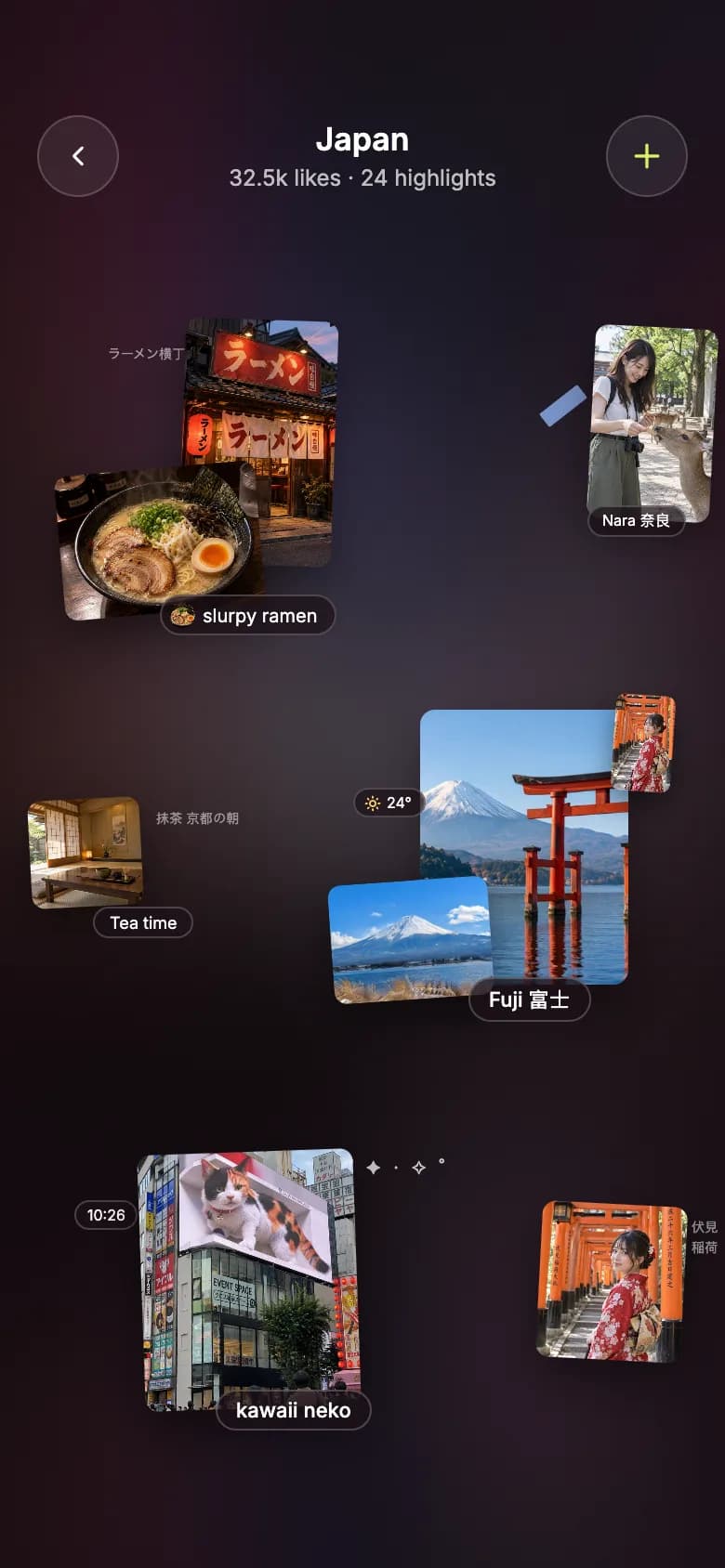
Collage board
Rotated photos, handwritten style captions and small stickers scattered across a dark scrapbook page.
Copy the Japan Trip Collage kit
Use the artifact as a design brief, the skill to generate the UI with an AI agent, or the code to run it right away.
Design artifact
The full design: tokens, screens and source
# Japan Trip Collage: design artifact
This travel collage app UI turns a trip into a scrapbook. A tall neon cover introduces the journey, then the collage board scatters photos, notes and stickers across a plum background.
- Type: Travel mobile app UI
- Screens: 2
- Artboard: 390 × 844
- Target: Expo SDK 58, Expo Router, TypeScript, expo-image, expo-linear-gradient, react-native-svg
- Live page: https://developermill.com/app-designs/travel-collage-app-ui-design
## Design direction
Plum night tones with pink and sky accents, a neon street cover and tilted photos scattered like a kawaii scrapbook.
- Peeking cover carousel for each trip
- Tilted photo cards with handwritten style notes
- Japanese labels and small sticker details
- Trip stats for days, highlights and friends
## Foundations
### Colour
| Token | Hex |
| --- | --- |
| Aubergine | `#1D1219` |
| Plum | `#2A1B23` |
| Mauve | `#5A3A4C` |
| Sakura | `#FF9EC4` |
| Sky | `#9ED8FF` |
| Lime | `#D8F36A` |
### Typography
- Typefaces: Inter, Playfair Display
- Common sizes (px): 7, 8, 9, 10, 11, 12, 13, 15
### Shape and depth
- Common corner radii (px): 1, 3, 5, 7, 8, 32
- Shadows: `0 10px 24px rgba(0,0,0,0.45)`, `0 10px 24px rgba(0,0,0,0.5)`, `0 28px 56px rgba(10,4,8,0.5)`, `0 12px 28px rgba(0,0,0,0.45)`
## Screens
### 1. Trip cover
A greeting, a serif trip title with dates and friend matches, and a tall neon photo in a peeking carousel.
Preview: https://developermill.com/app-designs/travel-collage-app-ui-design/cover.webp
Copy on this screen:
- Hello, Mariana
- Japan
- Jan 14 — Jan 22 · 24 highlights
- 35 friend match
### 2. Collage board
Rotated photos, handwritten style captions and small stickers scattered across a dark scrapbook page.
Preview: https://developermill.com/app-designs/travel-collage-app-ui-design/collage.webp
Copy on this screen:
- Japan
- 32.5k likes · 24 highlights
- ラーメン横丁 東京・新宿 夜の一杯
- slurpy ramen
- Nara 奈良
- 抹茶 京都の朝
- Tea time
- 24°
- Fuji 富士
- 10:26
- ⁺ ˚ ✦ · ✧ ˚
- kawaii neko
- 伏見 稲荷
## Full source
The original artboards as HTML. Image URLs point at the hosted demo assets.
### Trip cover (Main)
```html
<!doctype html>
<html lang="en">
<head>
<meta charset="utf-8">
<title>Home — Japan trip</title>
<script src="./support.js"></script>
</head>
<body>
<x-dc>
<helmet>
<link rel="preconnect" href="https://fonts.googleapis.com">
<link href="https://fonts.googleapis.com/css2?family=Inter:wght@400;500;600&family=Playfair+Display:wght@700&display=swap" rel="stylesheet">
<style>
body{margin:0}
a{color:#f3e9ef}a:hover{color:#ffffff}
</style>
</helmet>
<div style="width: 390px; height: 844px; position: relative; overflow: hidden; box-sizing: border-box; font-family: Inter, system-ui, sans-serif; color: #ffffff; background: radial-gradient(120% 60% at 50% 0%, #5a3a4c 0%, #3e2833 45%, #2a1b23 100%)">
<div style="height: 50px; padding: 0 30px; display: flex; align-items: center; justify-content: space-between; font-size: 15px; font-weight: 600">
<span>9:41</span>
<div style="display: flex; align-items: center; gap: 6px">
<svg width="18" height="12" viewBox="0 0 18 12" aria-hidden="true"><rect x="0" y="8" width="3" height="4" rx="1" fill="#fff"></rect><rect x="5" y="5.5" width="3" height="6.5" rx="1" fill="#fff"></rect><rect x="10" y="3" width="3" height="9" rx="1" fill="#fff"></rect><rect x="15" y="0" width="3" height="12" rx="1" fill="#fff"></rect></svg>
<svg width="16" height="12" viewBox="0 0 16 12" aria-hidden="true"><path d="M8 11.5 5.6 9a3.4 3.4 0 0 1 4.8 0L8 11.5Z" fill="#fff"></path><path d="M3.4 6.8a6.5 6.5 0 0 1 9.2 0" stroke="#fff" stroke-width="1.6" fill="none" stroke-linecap="round"></path><path d="M1 4.4a9.9 9.9 0 0 1 14 0" stroke="#fff" stroke-width="1.6" fill="none" stroke-linecap="round"></path></svg>
<svg width="26" height="12" viewBox="0 0 26 12" aria-hidden="true"><rect x="0.5" y="0.5" width="22" height="11" rx="3.5" stroke="#fff" stroke-opacity="0.45" fill="none"></rect><rect x="2" y="2" width="19" height="8" rx="2" fill="#fff"></rect><rect x="24" y="4" width="1.5" height="4" rx="0.75" fill="#fff" fill-opacity="0.45"></rect></svg>
</div>
</div>
<div style="padding: 24px 20px 0; display: flex; align-items: center; justify-content: space-between">
<div style="display: flex; align-items: center; gap: 10px">
<img src="https://developermill.com/app-designs/travel-collage-app-ui-design/assets/a77a77d7e2.jpg" alt="Mariana" style="width: 40px; height: 40px; border-radius: 50%; object-fit: cover; border: 2px solid rgba(255,255,255,0.55); box-sizing: border-box">
<span style="font-size: 15px; font-weight: 500; color: #f3e9ef">Hello, Mariana</span>
</div>
<div style="display: flex; gap: 10px">
<button aria-label="Notifications" style="width: 44px; height: 44px; border-radius: 50%; border: 1px solid rgba(255,255,255,0.18); background: rgba(255,255,255,0.07); display: flex; align-items: center; justify-content: center; padding: 0; cursor: pointer">
<svg width="18" height="18" viewBox="0 0 24 24" fill="none" stroke="#ffffff" stroke-width="1.8" stroke-linecap="round" stroke-linejoin="round" aria-hidden="true"><path d="M6 8a6 6 0 1 1 12 0c0 7 3 9 3 9H3s3-2 3-9"></path><path d="M10.3 21a1.94 1.94 0 0 0 3.4 0"></path></svg>
</button>
<button aria-label="Messages" style="width: 44px; height: 44px; border-radius: 50%; border: 1px solid rgba(255,255,255,0.18); background: rgba(255,255,255,0.07); display: flex; align-items: center; justify-content: center; padding: 0; cursor: pointer">
<svg width="18" height="18" viewBox="0 0 24 24" fill="none" stroke="#ffffff" stroke-width="1.8" stroke-linecap="round" stroke-linejoin="round" aria-hidden="true"><path d="M14 9a2 2 0 0 1-2 2H6l-4 4V4a2 2 0 0 1 2-2h8a2 2 0 0 1 2 2z"></path><path d="M18 9h2a2 2 0 0 1 2 2v11l-4-4h-6a2 2 0 0 1-2-2v-1"></path></svg>
</button>
</div>
</div>
<div style="margin-top: 46px; display: flex; flex-direction: column; align-items: center; gap: 8px">
<h1 style="margin: 0; font-family: 'Playfair Display', Georgia, serif; font-weight: 700; font-size: 34px; letter-spacing: 0.3px; color: #ffffff">Japan</h1>
<p style="margin: 0; font-size: 13px; color: rgba(255,255,255,0.72)">Jan 14 — Jan 22 · 24 highlights</p>
<div style="display: flex; align-items: center; gap: 8px">
<div style="display: flex">
<img src="https://developermill.com/app-designs/travel-collage-app-ui-design/assets/8ddbafb926.jpg" alt="" style="width: 20px; height: 20px; border-radius: 50%; object-fit: cover; border: 1.5px solid #3e2833">
<img src="https://developermill.com/app-designs/travel-collage-app-ui-design/assets/b8dc454dc4.jpg" alt="" style="width: 20px; height: 20px; border-radius: 50%; object-fit: cover; border: 1.5px solid #3e2833; margin-left: -7px">
<img src="https://developermill.com/app-designs/travel-collage-app-ui-design/assets/2a5c783113.jpg" alt="" style="width: 20px; height: 20px; border-radius: 50%; object-fit: cover; border: 1.5px solid #3e2833; margin-left: -7px">
</div>
<span style="font-size: 13px; color: rgba(255,255,255,0.8)">35 friend match</span>
</div>
</div>
<img src="https://developermill.com/app-designs/travel-collage-app-ui-design/assets/7750c39e71.jpg" alt="" style="position: absolute; left: -240px; top: 292px; width: 262px; height: 392px; object-fit: cover; border-radius: 32px">
<img src="https://developermill.com/app-designs/travel-collage-app-ui-design/assets/01951ba61b.jpg" alt="" style="position: absolute; left: 368px; top: 292px; width: 262px; height: 392px; object-fit: cover; border-radius: 32px">
<img src="https://developermill.com/app-designs/travel-collage-app-ui-design/assets/aa0ed97e21.jpg" alt="Neon street in Shibuya at night" style="position: absolute; left: 60px; top: 278px; width: 270px; height: 420px; object-fit: cover; border-radius: 46px; border: 1px solid rgba(255,255,255,0.14); box-sizing: border-box; box-shadow: 0 28px 56px rgba(10,4,8,0.5)">
<nav style="position: absolute; left: 20px; right: 20px; bottom: 34px; display: flex; align-items: center; justify-content: space-between">
<div style="display: flex; align-items: center; gap: 4px; padding: 6px; border-radius: 999px; border: 1px solid rgba(255,255,255,0.16); background: rgba(255,255,255,0.07)">
<button aria-label="Home" style="width: 46px; height: 46px; border-radius: 50%; border: none; background: transparent; display: flex; align-items: center; justify-content: center; padding: 0; cursor: pointer">
<svg width="20" height="20" viewBox="0 0 24 24" fill="none" stroke="#ffffff" stroke-width="1.8" stroke-linecap="round" stroke-linejoin="round" aria-hidden="true"><path d="M3 10.5 12 3l9 7.5V20a1 1 0 0 1-1 1h-5v-6h-6v6H4a1 1 0 0 1-1-1z"></path></svg>
</button>
<button aria-label="Trips, selected" style="width: 46px; height: 46px; border-radius: 50%; border: 1px solid rgba(255,255,255,0.22); background: rgba(255,255,255,0.16); display: flex; align-items: center; justify-content: center; padding: 0; cursor: pointer">
<svg width="20" height="20" viewBox="0 0 24 24" fill="none" stroke="#ffffff" stroke-width="1.8" stroke-linecap="round" stroke-linejoin="round" aria-hidden="true"><rect x="7" y="3" width="10" height="18" rx="2.5"></rect><path d="M3 6v12"></path><path d="M21 6v12"></path></svg>
</button>
<button aria-label="Favorites" style="width: 46px; height: 46px; border-radius: 50%; border: none; background: transparent; display: flex; align-items: center; justify-content: center; padding: 0; cursor: pointer">
<svg width="20" height="20" viewBox="0 0 24 24" fill="none" stroke="#ffffff" stroke-width="1.8" stroke-linecap="round" stroke-linejoin="round" aria-hidden="true"><path d="M19 14c1.5-1.5 3-3.2 3-5.5A5.5 5.5 0 0 0 16.5 3c-1.8 0-3 .5-4.5 2-1.5-1.5-2.7-2-4.5-2A5.5 5.5 0 0 0 2 8.5c0 2.3 1.5 4 3 5.5l7 7z"></path></svg>
</button>
</div>
<button aria-label="Add highlight" style="width: 58px; height: 58px; border-radius: 50%; border: 1px solid rgba(255,255,255,0.16); background: rgba(255,255,255,0.07); display: flex; align-items: center; justify-content: center; padding: 0; cursor: pointer">
<svg width="22" height="22" viewBox="0 0 24 24" fill="none" stroke="{{accent}}" stroke-width="2" stroke-linecap="round" aria-hidden="true"><path d="M12 5v14"></path><path d="M5 12h14"></path></svg>
</button>
</nav>
<div style="position: absolute; left: 50%; bottom: 8px; transform: translateX(-50%); width: 134px; height: 5px; border-radius: 3px; background: rgba(255,255,255,0.85)"></div>
</div>
</x-dc>
<script type="text/x-dc" data-dc-script data-props='{"accent":{"editor":"color","default":"#D8F36A","options":["#D8F36A","#FF9EC4","#9ED8FF"]},"$preview":{"width":390,"height":844}}'>
class Component extends DCLogic {
renderVals() {
return { accent: this.props.accent ?? '#D8F36A' };
}
}
</script>
</body>
</html>
```
### Collage board (Collage)
```html
<!doctype html>
<html lang="en">
<head>
<meta charset="utf-8">
<title>Trip collage — Japan</title>
<script src="./support.js"></script>
</head>
<body>
<x-dc>
<helmet>
<link rel="preconnect" href="https://fonts.googleapis.com">
<link href="https://fonts.googleapis.com/css2?family=Inter:wght@400;500;600&display=swap" rel="stylesheet">
<style>
body{margin:0}
a{color:#f3e9ef}a:hover{color:#ffffff}
</style>
</helmet>
<div style="width: 390px; height: 844px; position: relative; overflow: hidden; box-sizing: border-box; font-family: Inter, system-ui, sans-serif; color: #ffffff; background: #1d1219">
<img src="https://developermill.com/app-designs/travel-collage-app-ui-design/assets/aa0ed97e21.jpg" alt="" style="position: absolute; left: -80px; top: -80px; width: 550px; height: 1004px; object-fit: cover; filter: blur(48px) saturate(0.9) brightness(0.58)">
<div style="position: absolute; inset: 0; background: linear-gradient(90deg, rgba(22,12,18,0.55) 0%, rgba(22,12,18,0) 40%, rgba(22,12,18,0) 60%, rgba(22,12,18,0.55) 100%), linear-gradient(180deg, rgba(30,16,24,0.5) 0%, rgba(30,16,24,0.1) 45%, rgba(20,12,18,0.55) 100%)"></div>
<div style="position: relative; height: 50px; padding: 0 30px; display: flex; align-items: center; justify-content: space-between; font-size: 15px; font-weight: 600">
<span>9:41</span>
<div style="display: flex; align-items: center; gap: 6px">
<svg width="18" height="12" viewBox="0 0 18 12" aria-hidden="true"><rect x="0" y="8" width="3" height="4" rx="1" fill="#fff"></rect><rect x="5" y="5.5" width="3" height="6.5" rx="1" fill="#fff"></rect><rect x="10" y="3" width="3" height="9" rx="1" fill="#fff"></rect><rect x="15" y="0" width="3" height="12" rx="1" fill="#fff"></rect></svg>
<svg width="16" height="12" viewBox="0 0 16 12" aria-hidden="true"><path d="M8 11.5 5.6 9a3.4 3.4 0 0 1 4.8 0L8 11.5Z" fill="#fff"></path><path d="M3.4 6.8a6.5 6.5 0 0 1 9.2 0" stroke="#fff" stroke-width="1.6" fill="none" stroke-linecap="round"></path><path d="M1 4.4a9.9 9.9 0 0 1 14 0" stroke="#fff" stroke-width="1.6" fill="none" stroke-linecap="round"></path></svg>
<svg width="26" height="12" viewBox="0 0 26 12" aria-hidden="true"><rect x="0.5" y="0.5" width="22" height="11" rx="3.5" stroke="#fff" stroke-opacity="0.45" fill="none"></rect><rect x="2" y="2" width="19" height="8" rx="2" fill="#fff"></rect><rect x="24" y="4" width="1.5" height="4" rx="0.75" fill="#fff" fill-opacity="0.45"></rect></svg>
</div>
</div>
<header style="position: relative; padding: 12px 20px 0; display: flex; align-items: center; justify-content: space-between">
<a href="Main.dc.html" aria-label="Back" style="width: 44px; height: 44px; border-radius: 50%; border: 1px solid rgba(255,255,255,0.18); background: rgba(255,255,255,0.07); display: flex; align-items: center; justify-content: center; box-sizing: border-box">
<svg width="18" height="18" viewBox="0 0 24 24" fill="none" stroke="#ffffff" stroke-width="2" stroke-linecap="round" stroke-linejoin="round" aria-hidden="true"><path d="m15 18-6-6 6-6"></path></svg>
</a>
<div style="display: flex; flex-direction: column; align-items: center; gap: 3px">
<h1 style="margin: 0; font-size: 17px; font-weight: 600; color: #ffffff">Japan</h1>
<p style="margin: 0; font-size: 12px; color: rgba(255,255,255,0.72)">32.5k likes · 24 highlights</p>
</div>
<button aria-label="Add to collage" style="width: 44px; height: 44px; border-radius: 50%; border: 1px solid rgba(255,255,255,0.18); background: rgba(255,255,255,0.07); display: flex; align-items: center; justify-content: center; padding: 0; cursor: pointer">
<svg width="20" height="20" viewBox="0 0 24 24" fill="none" stroke="{{accent}}" stroke-width="2" stroke-linecap="round" aria-hidden="true"><path d="M12 5v14"></path><path d="M5 12h14"></path></svg>
</button>
</header>
<!-- Ramen cluster -->
<p style="position: absolute; left: 58px; top: 186px; margin: 0; font-size: 7px; line-height: 1.5; color: rgba(255,255,255,0.55); white-space: pre-line">ラーメン横丁
東京・新宿
夜の一杯</p>
<img src="https://developermill.com/app-designs/travel-collage-app-ui-design/assets/a507517a89.jpg" alt="Ramen shop with red lanterns" style="position: absolute; left: 98px; top: 172px; width: 82px; height: 132px; object-fit: cover; border-radius: 7px; transform: rotate(2deg); box-shadow: 0 10px 24px rgba(0,0,0,0.45)">
<img src="https://developermill.com/app-designs/travel-collage-app-ui-design/assets/6a186a953e.jpg" alt="Bowl of tonkotsu ramen" style="position: absolute; left: 32px; top: 252px; width: 108px; height: 78px; object-fit: cover; border-radius: 7px; transform: rotate(-5deg); box-shadow: 0 10px 24px rgba(0,0,0,0.5)">
<img src="https://developermill.com/app-designs/travel-collage-app-ui-design/assets/518ee1004b.png" alt="" style="position: absolute; left: 160px; top: 232px; width: 40px; transform: rotate(14deg)">
<span style="position: absolute; left: 86px; top: 320px; display: flex; align-items: center; gap: 4px; padding: 3px 9px 3px 4px; border-radius: 999px; background: rgba(28,16,24,0.72); border: 1px solid rgba(255,255,255,0.2); font-size: 10px; color: #ffffff">
<img src="https://developermill.com/app-designs/travel-collage-app-ui-design/assets/6a186a953e.jpg" alt="" style="width: 14px; height: 14px; border-radius: 50%; object-fit: cover">slurpy ramen</span>
<!-- Nara cluster -->
<div style="position: absolute; left: 290px; top: 214px; width: 26px; height: 9px; background: rgba(150,190,255,0.75); transform: rotate(-38deg); border-radius: 1px"></div>
<img src="https://developermill.com/app-designs/travel-collage-app-ui-design/assets/529b57b3ec.jpg" alt="Feeding a deer in Nara Park" style="position: absolute; left: 318px; top: 176px; width: 66px; height: 104px; object-fit: cover; border-radius: 7px; transform: rotate(3deg); box-shadow: 0 10px 24px rgba(0,0,0,0.45)">
<span style="position: absolute; left: 316px; top: 272px; padding: 2px 7px; border-radius: 999px; background: rgba(28,16,24,0.72); border: 1px solid rgba(255,255,255,0.2); font-size: 8px; color: #ffffff">Nara 奈良</span>
<!-- Tea cluster -->
<img src="https://developermill.com/app-designs/travel-collage-app-ui-design/assets/069948b159.jpg" alt="Tatami tea room with matcha" style="position: absolute; left: 16px; top: 430px; width: 60px; height: 58px; object-fit: cover; border-radius: 7px; transform: rotate(-3deg); box-shadow: 0 10px 24px rgba(0,0,0,0.45)">
<p style="position: absolute; left: 84px; top: 436px; margin: 0; font-size: 7px; line-height: 1.5; color: rgba(255,255,255,0.5); white-space: pre-line">抹茶
京都の朝</p>
<span style="position: absolute; left: 50px; top: 488px; padding: 2px 8px; border-radius: 999px; background: rgba(28,16,24,0.72); border: 1px solid rgba(255,255,255,0.2); font-size: 9px; color: #ffffff">Tea time</span>
<!-- Fuji cluster -->
<img src="https://developermill.com/app-designs/travel-collage-app-ui-design/assets/2b453d8083.jpg" alt="Torii gate in Lake Ashi with Mount Fuji" style="position: absolute; left: 226px; top: 382px; width: 112px; height: 148px; object-fit: cover; border-radius: 8px; box-shadow: 0 12px 28px rgba(0,0,0,0.45)">
<img src="https://developermill.com/app-designs/travel-collage-app-ui-design/assets/54c0ac64c9.jpg" alt="Woman in red kimono" style="position: absolute; left: 330px; top: 374px; width: 32px; height: 52px; object-fit: cover; border-radius: 5px; transform: rotate(4deg); box-shadow: 0 6px 14px rgba(0,0,0,0.45)">
<img src="https://developermill.com/app-designs/travel-collage-app-ui-design/assets/c9c36ea091.png" alt="" style="position: absolute; left: 340px; top: 426px; width: 26px">
<span style="position: absolute; left: 190px; top: 424px; display: flex; align-items: center; gap: 3px; padding: 2px 7px 2px 5px; border-radius: 999px; background: rgba(28,16,24,0.72); border: 1px solid rgba(255,255,255,0.2); font-size: 8px; color: #ffffff">
<svg width="9" height="9" viewBox="0 0 24 24" fill="none" stroke="#FFD66B" stroke-width="2.4" stroke-linecap="round" aria-hidden="true"><circle cx="12" cy="12" r="4"></circle><path d="M12 2v2M12 20v2M4.9 4.9l1.4 1.4M17.7 17.7l1.4 1.4M2 12h2M20 12h2M4.9 19.1l1.4-1.4M17.7 6.3l1.4-1.4"></path></svg>24°</span>
<img src="https://developermill.com/app-designs/travel-collage-app-ui-design/assets/839d30c1a0.jpg" alt="Snow-capped Mount Fuji" style="position: absolute; left: 178px; top: 474px; width: 86px; height: 64px; object-fit: cover; border-radius: 7px; transform: rotate(-4deg); box-shadow: 0 10px 24px rgba(0,0,0,0.5)">
<span style="position: absolute; left: 252px; top: 526px; padding: 3px 10px; border-radius: 999px; background: rgba(28,16,24,0.72); border: 1px solid rgba(255,255,255,0.22); font-size: 11px; font-weight: 500; color: #ffffff">Fuji 富士</span>
<!-- Neko cluster -->
<span style="position: absolute; left: 40px; top: 646px; padding: 2px 6px; border-radius: 999px; background: rgba(28,16,24,0.72); border: 1px solid rgba(255,255,255,0.2); font-size: 8px; color: #ffffff">10:26</span>
<p style="position: absolute; left: 176px; top: 622px; margin: 0; font-size: 10px; letter-spacing: 2px; color: rgba(255,255,255,0.75)">⁺ ˚ ✦ · ✧ ˚</p>
<img src="https://developermill.com/app-designs/travel-collage-app-ui-design/assets/bd270f828d.jpg" alt="3D cat billboard in Shinjuku" style="position: absolute; left: 76px; top: 620px; width: 116px; height: 138px; object-fit: cover; border-radius: 7px; transform: rotate(-2deg); box-shadow: 0 12px 26px rgba(0,0,0,0.5)">
<img src="https://developermill.com/app-designs/travel-collage-app-ui-design/assets/5531c740a7.png" alt="" style="position: absolute; left: 56px; top: 716px; width: 36px; transform: rotate(-18deg)">
<span style="position: absolute; left: 116px; top: 748px; padding: 3px 10px; border-radius: 999px; background: rgba(28,16,24,0.72); border: 1px solid rgba(255,255,255,0.22); font-size: 11px; font-weight: 500; color: #ffffff">kawaii neko</span>
<!-- Kimono cluster -->
<img src="https://developermill.com/app-designs/travel-collage-app-ui-design/assets/54c0ac64c9.jpg" alt="Kimono at Fushimi Inari" style="position: absolute; left: 290px; top: 648px; width: 78px; height: 84px; object-fit: cover; object-position: 50% 30%; border-radius: 7px; transform: rotate(3deg); box-shadow: 0 10px 24px rgba(0,0,0,0.5)">
<p style="position: absolute; left: 372px; top: 656px; margin: 0; font-size: 7px; line-height: 1.5; color: rgba(255,255,255,0.5); white-space: pre-line">伏見
稲荷</p>
<img src="https://developermill.com/app-designs/travel-collage-app-ui-design/assets/6bcac6fd8a.png" alt="" style="position: absolute; left: 338px; top: 708px; width: 32px; transform: rotate(10deg)">
<div style="position: absolute; left: 50%; bottom: 8px; transform: translateX(-50%); width: 134px; height: 5px; border-radius: 3px; background: rgba(255,255,255,0.85)"></div>
</div>
</x-dc>
<script type="text/x-dc" data-dc-script data-props='{"accent":{"editor":"color","default":"#D8F36A","options":["#D8F36A","#FF9EC4","#9ED8FF"]},"$preview":{"width":390,"height":844}}'>
class Component extends DCLogic {
renderVals() {
return { accent: this.props.accent ?? '#D8F36A' };
}
}
</script>
</body>
</html>
```SKILL.md
Save as .claude/skills/travel-collage-app-ui/SKILL.md
---
name: travel-collage-app-ui
description: Build the Japan Trip Collage mobile app UI in Expo React Native. Use when asked to create a travel journal app UI or a new screen in this visual style.
---

# Japan Trip Collage app UI

Build this travel app UI in an Expo Router project with TypeScript.

Reference: https://developermill.com/app-designs/travel-collage-app-ui-design

## Visual direction

Plum night tones with pink and sky accents, a neon street cover and tilted photos scattered like a kawaii scrapbook.

Keep these signature details:

- Peeking cover carousel for each trip
- Tilted photo cards with handwritten style notes
- Japanese labels and small sticker details
- Trip stats for days, highlights and friends

## Set up

```bash
npx expo install expo-image expo-linear-gradient react-native-svg @expo-google-fonts/inter @expo-google-fonts/playfair-display expo-font
```

## Tokens

| Name | Hex |
| --- | --- |
| Aubergine | `#1D1219` |
| Plum | `#2A1B23` |
| Mauve | `#5A3A4C` |
| Sakura | `#FF9EC4` |
| Sky | `#9ED8FF` |
| Lime | `#D8F36A` |

- Typefaces: Inter, Playfair Display
- Text sizes (px): 7, 8, 9, 10, 11, 12, 13, 15
- Corner radii (px): 1, 3, 5, 7, 8, 32

Define these once and reuse them. Do not add new colours.

## Screens

1. **Trip cover.** A greeting, a serif trip title with dates and friend matches, and a tall neon photo in a peeking carousel.
2. **Collage board.** Rotated photos, handwritten style captions and small stickers scattered across a dark scrapbook page.

## Build rules

- Draw each screen on a 390 × 844 artboard and scale it to the device width.
- Load each custom font weight by family name with expo-font. Do not set fontWeight with custom fonts.
- Draw icons, charts and illustrations with react-native-svg.
- Use Pressable with an accessibilityLabel for controls, with at least a 44px target.
- Navigate with router.navigate and keep sample data as constants at the top of the file.
- Use expo-image with contentFit for photos.

## Done when

- All routes are linked and reachable.
- Colours, type and radii match the tokens above.
- `npx tsc --noEmit` and `npx expo lint` pass.
- The layout holds up on small and large phones.
Set up the project
npx create-expo-app@latest travel-collage-app --template default
cd travel-collage-app
rm -rf src
npx expo install expo-image expo-linear-gradient react-native-svg @expo-google-fonts/inter @expo-google-fonts/playfair-display expo-font
src/app/_layout.tsx
import { Inter_400Regular, Inter_500Medium, Inter_600SemiBold } from '@expo-google-fonts/inter';
import { PlayfairDisplay_700Bold } from '@expo-google-fonts/playfair-display';
import { useFonts } from 'expo-font';
import { Stack } from 'expo-router';

export default function RootLayout() {
  const [fontsLoaded] = useFonts({
    Inter_400Regular,
    Inter_500Medium,
    Inter_600SemiBold,
    PlayfairDisplay_700Bold,
  });

  if (!fontsLoaded) return null;

  return <Stack screenOptions={{ headerShown: false }} />;
}
src/app/index.tsx
import { Image } from 'expo-image';
import { Pressable, StyleSheet, Text, View } from 'react-native';
import Svg, { Defs, Path, RadialGradient, Rect, Stop } from 'react-native-svg';

import { Screen } from '@/components/screen';
import { asset } from '@/lib/assets';

const accent = '#D8F36A';

export default function MainScreen() {
  return (
    <Screen background="#FFFFFF" statusBar="dark">
      <View style={{ flex: 1 }}>
        <Svg style={StyleSheet.absoluteFill} width="100%" height="100%">
          <Defs>
            <RadialGradient id="glow4" cx="50%" cy="0%" rx="120%" ry="60%" fx="50%" fy="0%">
              <Stop offset="0%" stopColor="#5a3a4c" />
              <Stop offset="45%" stopColor="#3e2833" />
              <Stop offset="100%" stopColor="#2a1b23" />
            </RadialGradient>
          </Defs>
          <Rect width="100%" height="100%" fill="url(#glow4)" />
        </Svg>
        <View
          style={{
            height: 50,
            paddingVertical: 0,
            paddingHorizontal: 30,
            alignItems: 'center',
            justifyContent: 'space-between',
            flexDirection: 'row',
          }}
        />
        <View
          style={{
            paddingTop: 24,
            paddingBottom: 0,
            paddingHorizontal: 20,
            alignItems: 'center',
            justifyContent: 'space-between',
            flexDirection: 'row',
          }}>
          <View style={{ alignItems: 'center', gap: 10, flexShrink: 1, flexDirection: 'row' }}>
            <Image
              source={{ uri: asset('a77a77d7e2.jpg') }}
              contentFit="cover"
              accessibilityLabel="Mariana"
              style={{
                width: 40,
                height: 40,
                borderRadius: '50%',
                borderWidth: 2,
                borderColor: 'rgba(255,255,255,0.55)',
              }}
            />
            <Text
              style={{
                flexShrink: 1,
                fontFamily: 'Inter_500Medium',
                fontSize: 15,
                color: '#f3e9ef',
              }}>
              Hello, Mariana
            </Text>
          </View>
          <View style={{ gap: 10, flexShrink: 1, flexDirection: 'row' }}>
            <Pressable
              accessibilityRole="button"
              accessibilityLabel="Notifications"
              style={{
                width: 44,
                height: 44,
                borderRadius: '50%',
                borderWidth: 1,
                borderColor: 'rgba(255,255,255,0.18)',
                backgroundColor: 'rgba(255,255,255,0.07)',
                alignItems: 'center',
                justifyContent: 'center',
                padding: 0,
                flexDirection: 'row',
              }}>
              <Svg
                width="18"
                height="18"
                viewBox="0 0 24 24"
                fill="none"
                stroke="#ffffff"
                strokeWidth="1.8"
                strokeLinecap="round"
                strokeLinejoin="round">
                <Path d="M6 8a6 6 0 1 1 12 0c0 7 3 9 3 9H3s3-2 3-9" />
                <Path d="M10.3 21a1.94 1.94 0 0 0 3.4 0" />
              </Svg>
            </Pressable>
            <Pressable
              accessibilityRole="button"
              accessibilityLabel="Messages"
              style={{
                width: 44,
                height: 44,
                borderRadius: '50%',
                borderWidth: 1,
                borderColor: 'rgba(255,255,255,0.18)',
                backgroundColor: 'rgba(255,255,255,0.07)',
                alignItems: 'center',
                justifyContent: 'center',
                padding: 0,
                flexDirection: 'row',
              }}>
              <Svg
                width="18"
                height="18"
                viewBox="0 0 24 24"
                fill="none"
                stroke="#ffffff"
                strokeWidth="1.8"
                strokeLinecap="round"
                strokeLinejoin="round">
                <Path d="M14 9a2 2 0 0 1-2 2H6l-4 4V4a2 2 0 0 1 2-2h8a2 2 0 0 1 2 2z" />
                <Path d="M18 9h2a2 2 0 0 1 2 2v11l-4-4h-6a2 2 0 0 1-2-2v-1" />
              </Svg>
            </Pressable>
          </View>
        </View>
        <View style={{ marginTop: 46, alignItems: 'center', gap: 8 }}>
          <Text
            style={{
              margin: 0,
              fontFamily: 'PlayfairDisplay_700Bold',
              fontSize: 34,
              color: '#ffffff',
              letterSpacing: 0.3,
            }}>
            Japan
          </Text>
          <Text
            style={{
              margin: 0,
              fontFamily: 'Inter_400Regular',
              fontSize: 13,
              color: 'rgba(255,255,255,0.72)',
            }}>
            Jan 14 — Jan 22 · 24 highlights
          </Text>
          <View style={{ alignItems: 'center', gap: 8, flexDirection: 'row' }}>
            <View style={{ flexShrink: 1, flexDirection: 'row' }}>
              <Image
                source={{ uri: asset('8ddbafb926.jpg') }}
                contentFit="cover"
                style={{
                  width: 23,
                  height: 23,
                  borderRadius: '50%',
                  borderWidth: 1.5,
                  borderColor: '#3e2833',
                }}
              />
              <Image
                source={{ uri: asset('b8dc454dc4.jpg') }}
                contentFit="cover"
                style={{
                  width: 23,
                  height: 23,
                  borderRadius: '50%',
                  borderWidth: 1.5,
                  borderColor: '#3e2833',
                  marginLeft: -7,
                }}
              />
              <Image
                source={{ uri: asset('2a5c783113.jpg') }}
                contentFit="cover"
                style={{
                  width: 23,
                  height: 23,
                  borderRadius: '50%',
                  borderWidth: 1.5,
                  borderColor: '#3e2833',
                  marginLeft: -7,
                }}
              />
            </View>
            <Text
              style={{
                flexShrink: 1,
                fontFamily: 'Inter_400Regular',
                fontSize: 13,
                color: 'rgba(255,255,255,0.8)',
              }}>
              35 friend match
            </Text>
          </View>
        </View>
        <Image
          source={{ uri: asset('7750c39e71.jpg') }}
          contentFit="cover"
          style={{
            position: 'absolute',
            left: -240,
            top: 292,
            width: 262,
            height: 392,
            borderRadius: 32,
          }}
        />
        <Image
          source={{ uri: asset('01951ba61b.jpg') }}
          contentFit="cover"
          style={{
            position: 'absolute',
            left: 368,
            top: 292,
            width: 262,
            height: 392,
            borderRadius: 32,
          }}
        />
        <Image
          source={{ uri: asset('aa0ed97e21.jpg') }}
          contentFit="cover"
          accessibilityLabel="Neon street in Shibuya at night"
          style={{
            position: 'absolute',
            left: 60,
            top: 278,
            width: 270,
            height: 420,
            borderRadius: 46,
            borderWidth: 1,
            borderColor: 'rgba(255,255,255,0.14)',
            boxShadow: '0 28px 56px rgba(10,4,8,0.5)',
          }}
        />
        <View
          style={{
            position: 'absolute',
            left: 20,
            right: 20,
            bottom: 34,
            alignItems: 'center',
            justifyContent: 'space-between',
            flexDirection: 'row',
          }}>
          <View
            style={{
              alignItems: 'center',
              gap: 4,
              padding: 6,
              borderRadius: 999,
              borderWidth: 1,
              borderColor: 'rgba(255,255,255,0.16)',
              backgroundColor: 'rgba(255,255,255,0.07)',
              flexShrink: 1,
              flexDirection: 'row',
            }}>
            <Pressable
              accessibilityRole="button"
              accessibilityLabel="Home"
              style={{
                width: 46,
                height: 46,
                borderRadius: '50%',
                borderWidth: 0,
                alignItems: 'center',
                justifyContent: 'center',
                padding: 0,
                flexDirection: 'row',
              }}>
              <Svg
                width="20"
                height="20"
                viewBox="0 0 24 24"
                fill="none"
                stroke="#ffffff"
                strokeWidth="1.8"
                strokeLinecap="round"
                strokeLinejoin="round">
                <Path d="M3 10.5 12 3l9 7.5V20a1 1 0 0 1-1 1h-5v-6h-6v6H4a1 1 0 0 1-1-1z" />
              </Svg>
            </Pressable>
            <Pressable
              accessibilityRole="button"
              accessibilityLabel="Trips, selected"
              style={{
                width: 46,
                height: 46,
                borderRadius: '50%',
                borderWidth: 1,
                borderColor: 'rgba(255,255,255,0.22)',
                backgroundColor: 'rgba(255,255,255,0.16)',
                alignItems: 'center',
                justifyContent: 'center',
                padding: 0,
                flexDirection: 'row',
              }}>
              <Svg
                width="20"
                height="20"
                viewBox="0 0 24 24"
                fill="none"
                stroke="#ffffff"
                strokeWidth="1.8"
                strokeLinecap="round"
                strokeLinejoin="round">
                <Rect x="7" y="3" width="10" height="18" rx="2.5" />
                <Path d="M3 6v12" />
                <Path d="M21 6v12" />
              </Svg>
            </Pressable>
            <Pressable
              accessibilityRole="button"
              accessibilityLabel="Favorites"
              style={{
                width: 46,
                height: 46,
                borderRadius: '50%',
                borderWidth: 0,
                alignItems: 'center',
                justifyContent: 'center',
                padding: 0,
                flexDirection: 'row',
              }}>
              <Svg
                width="20"
                height="20"
                viewBox="0 0 24 24"
                fill="none"
                stroke="#ffffff"
                strokeWidth="1.8"
                strokeLinecap="round"
                strokeLinejoin="round">
                <Path d="M19 14c1.5-1.5 3-3.2 3-5.5A5.5 5.5 0 0 0 16.5 3c-1.8 0-3 .5-4.5 2-1.5-1.5-2.7-2-4.5-2A5.5 5.5 0 0 0 2 8.5c0 2.3 1.5 4 3 5.5l7 7z" />
              </Svg>
            </Pressable>
          </View>
          <Pressable
            accessibilityRole="button"
            accessibilityLabel="Add highlight"
            style={{
              width: 58,
              height: 58,
              borderRadius: '50%',
              borderWidth: 1,
              borderColor: 'rgba(255,255,255,0.16)',
              backgroundColor: 'rgba(255,255,255,0.07)',
              alignItems: 'center',
              justifyContent: 'center',
              padding: 0,
              flexDirection: 'row',
            }}>
            <Svg
              width="22"
              height="22"
              viewBox="0 0 24 24"
              fill="none"
              stroke={accent}
              strokeWidth="2"
              strokeLinecap="round">
              <Path d="M12 5v14" />
              <Path d="M5 12h14" />
            </Svg>
          </Pressable>
        </View>
      </View>
    </Screen>
  );
}
src/app/collage.tsx
import { Image } from 'expo-image';
import { LinearGradient } from 'expo-linear-gradient';
import { router } from 'expo-router';
import { Pressable, StyleSheet, Text, View } from 'react-native';
import Svg, { Circle, Path } from 'react-native-svg';
import { Screen } from '@/components/screen';
import { asset } from '@/lib/assets';
const accent = '#D8F36A';
export default function CollageScreen() {
return (
<Screen background="#1d1219" statusBar="light">
<View style={{ flex: 1 }}>
<Image
source={{ uri: asset('aa0ed97e21.jpg') }}
contentFit="cover"
style={{
position: 'absolute',
left: -80,
top: -80,
width: 550,
height: 1004,
filter: 'blur(48px) saturate(0.9) brightness(0.58)',
}}
/>
<View style={{ position: 'absolute', top: 0, right: 0, bottom: 0, left: 0 }}>
<LinearGradient
colors={['rgba(30,16,24,0.5)', 'rgba(30,16,24,0.1)', 'rgba(20,12,18,0.55)']}
locations={[0, 0.45, 1]}
start={{ x: 0.5, y: 0 }}
end={{ x: 0.5, y: 1 }}
style={StyleSheet.absoluteFill}
/>
<LinearGradient
colors={[
'rgba(22,12,18,0.55)',
'rgba(22,12,18,0)',
'rgba(22,12,18,0)',
'rgba(22,12,18,0.55)',
]}
locations={[0, 0.4, 0.6, 1]}
start={{ x: 0, y: 0.5 }}
end={{ x: 1, y: 0.5 }}
style={StyleSheet.absoluteFill}
/>
</View>
<View
style={{
height: 50,
paddingVertical: 0,
paddingHorizontal: 30,
alignItems: 'center',
justifyContent: 'space-between',
flexDirection: 'row',
}}
/>
<View
style={{
paddingTop: 12,
paddingBottom: 0,
paddingHorizontal: 20,
alignItems: 'center',
justifyContent: 'space-between',
flexDirection: 'row',
}}>
<Pressable
accessibilityRole="link"
accessibilityLabel="Back"
onPress={() => router.navigate('/')}
style={{
width: 44,
height: 44,
borderRadius: '50%',
borderWidth: 1,
borderColor: 'rgba(255,255,255,0.18)',
backgroundColor: 'rgba(255,255,255,0.07)',
alignItems: 'center',
justifyContent: 'center',
flexDirection: 'row',
}}>
<Svg
width="18"
height="18"
viewBox="0 0 24 24"
fill="none"
stroke="#ffffff"
strokeWidth="2"
strokeLinecap="round"
strokeLinejoin="round">
<Path d="m15 18-6-6 6-6" />
</Svg>
</Pressable>
<View style={{ alignItems: 'center', gap: 3, flexShrink: 1 }}>
<Text
style={{
margin: 0,
fontFamily: 'Inter_600SemiBold',
fontSize: 17,
color: '#ffffff',
}}>
Japan
</Text>
<Text
style={{
margin: 0,
fontFamily: 'Inter_400Regular',
fontSize: 12,
color: 'rgba(255,255,255,0.72)',
}}>
32.5k likes · 24 highlights
</Text>
</View>
<Pressable
accessibilityRole="button"
accessibilityLabel="Add to collage"
style={{
width: 44,
height: 44,
borderRadius: '50%',
borderWidth: 1,
borderColor: 'rgba(255,255,255,0.18)',
backgroundColor: 'rgba(255,255,255,0.07)',
alignItems: 'center',
justifyContent: 'center',
padding: 0,
flexDirection: 'row',
}}>
<Svg
width="20"
height="20"
viewBox="0 0 24 24"
fill="none"
stroke={accent}
strokeWidth="2"
strokeLinecap="round">
<Path d="M12 5v14" />
<Path d="M5 12h14" />
</Svg>
</Pressable>
</View>
<Text
style={{
position: 'absolute',
left: 58,
top: 186,
margin: 0,
fontFamily: 'Inter_400Regular',
fontSize: 7,
color: 'rgba(255,255,255,0.55)',
lineHeight: 10.5,
}}>
ラーメン横丁 東京・新宿 夜の一杯
</Text>
<Image
source={{ uri: asset('a507517a89.jpg') }}
contentFit="cover"
accessibilityLabel="Ramen shop with red lanterns"
style={{
position: 'absolute',
left: 98,
top: 172,
width: 82,
height: 132,
borderRadius: 7,
transform: [{ rotate: '2deg' }],
boxShadow: '0 10px 24px rgba(0,0,0,0.45)',
}}
/>
<Image
source={{ uri: asset('6a186a953e.jpg') }}
contentFit="cover"
accessibilityLabel="Bowl of tonkotsu ramen"
style={{
position: 'absolute',
left: 32,
top: 252,
width: 108,
height: 78,
borderRadius: 7,
transform: [{ rotate: '-5deg' }],
boxShadow: '0 10px 24px rgba(0,0,0,0.5)',
}}
/>
<Image
source={{ uri: asset('518ee1004b.png') }}
contentFit="fill"
style={{
position: 'absolute',
left: 160,
top: 232,
width: 40,
transform: [{ rotate: '14deg' }],
}}
/>
<View
style={{
position: 'absolute',
left: 86,
top: 320,
alignItems: 'center',
gap: 4,
paddingVertical: 3,
paddingLeft: 4,
paddingRight: 9,
borderRadius: 999,
backgroundColor: 'rgba(28,16,24,0.72)',
borderWidth: 1,
borderColor: 'rgba(255,255,255,0.2)',
flexDirection: 'row',
}}>
<Image
source={{ uri: asset('6a186a953e.jpg') }}
contentFit="cover"
style={{ width: 14, height: 14, borderRadius: '50%' }}
/>
<Text
style={{
fontFamily: 'Inter_400Regular',
fontSize: 10,
color: '#ffffff',
flexShrink: 1,
}}>
slurpy ramen
</Text>
</View>
<View
style={{
position: 'absolute',
left: 290,
top: 214,
width: 26,
height: 9,
backgroundColor: 'rgba(150,190,255,0.75)',
transform: [{ rotate: '-38deg' }],
borderRadius: 1,
}}
/>
<Image
source={{ uri: asset('529b57b3ec.jpg') }}
contentFit="cover"
accessibilityLabel="Feeding a deer in Nara Park"
style={{
position: 'absolute',
left: 318,
top: 176,
width: 66,
height: 104,
borderRadius: 7,
transform: [{ rotate: '3deg' }],
boxShadow: '0 10px 24px rgba(0,0,0,0.45)',
}}
/>
<Text
style={{
position: 'absolute',
left: 316,
top: 272,
paddingVertical: 2,
paddingHorizontal: 7,
borderRadius: 999,
backgroundColor: 'rgba(28,16,24,0.72)',
borderWidth: 1,
borderColor: 'rgba(255,255,255,0.2)',
fontFamily: 'Inter_400Regular',
fontSize: 8,
color: '#ffffff',
}}>
Nara 奈良
</Text>
<Image
source={{ uri: asset('069948b159.jpg') }}
contentFit="cover"
accessibilityLabel="Tatami tea room with matcha"
style={{
position: 'absolute',
left: 16,
top: 430,
width: 60,
height: 58,
borderRadius: 7,
transform: [{ rotate: '-3deg' }],
boxShadow: '0 10px 24px rgba(0,0,0,0.45)',
}}
/>
<Text
style={{
position: 'absolute',
left: 84,
top: 436,
margin: 0,
fontFamily: 'Inter_400Regular',
fontSize: 7,
color: 'rgba(255,255,255,0.5)',
lineHeight: 10.5,
}}>
抹茶 京都の朝
</Text>
<Text
style={{
position: 'absolute',
left: 50,
top: 488,
paddingVertical: 2,
paddingHorizontal: 8,
borderRadius: 999,
backgroundColor: 'rgba(28,16,24,0.72)',
borderWidth: 1,
borderColor: 'rgba(255,255,255,0.2)',
fontFamily: 'Inter_400Regular',
fontSize: 9,
color: '#ffffff',
}}>
Tea time
</Text>
<Image
source={{ uri: asset('2b453d8083.jpg') }}
contentFit="cover"
accessibilityLabel="Torii gate in Lake Ashi with Mount Fuji"
style={{
position: 'absolute',
left: 226,
top: 382,
width: 112,
height: 148,
borderRadius: 8,
boxShadow: '0 12px 28px rgba(0,0,0,0.45)',
}}
/>
<Image
source={{ uri: asset('54c0ac64c9.jpg') }}
contentFit="cover"
accessibilityLabel="Woman in red kimono"
style={{
position: 'absolute',
left: 330,
top: 374,
width: 32,
height: 52,
borderRadius: 5,
transform: [{ rotate: '4deg' }],
boxShadow: '0 6px 14px rgba(0,0,0,0.45)',
}}
/>
<Image
source={{ uri: asset('c9c36ea091.png') }}
contentFit="fill"
style={{ position: 'absolute', left: 340, top: 426, width: 26 }}
/>
<View
style={{
position: 'absolute',
left: 190,
top: 424,
alignItems: 'center',
gap: 3,
paddingVertical: 2,
paddingLeft: 5,
paddingRight: 7,
borderRadius: 999,
backgroundColor: 'rgba(28,16,24,0.72)',
borderWidth: 1,
borderColor: 'rgba(255,255,255,0.2)',
flexDirection: 'row',
}}>
<Svg
width="9"
height="9"
viewBox="0 0 24 24"
fill="none"
stroke="#FFD66B"
strokeWidth="2.4"
strokeLinecap="round">
<Circle cx="12" cy="12" r="4" />
<Path d="M12 2v2M12 20v2M4.9 4.9l1.4 1.4M17.7 17.7l1.4 1.4M2 12h2M20 12h2M4.9 19.1l1.4-1.4M17.7 6.3l1.4-1.4" />
</Svg>
<Text
style={{
fontFamily: 'Inter_400Regular',
fontSize: 8,
color: '#ffffff',
flexShrink: 1,
}}>
24°
</Text>
</View>
<Image
source={{ uri: asset('839d30c1a0.jpg') }}
contentFit="cover"
accessibilityLabel="Snow-capped Mount Fuji"
style={{
position: 'absolute',
left: 178,
top: 474,
width: 86,
height: 64,
borderRadius: 7,
transform: [{ rotate: '-4deg' }],
boxShadow: '0 10px 24px rgba(0,0,0,0.5)',
}}
/>
<Text
style={{
position: 'absolute',
left: 252,
top: 526,
paddingVertical: 3,
paddingHorizontal: 10,
borderRadius: 999,
backgroundColor: 'rgba(28,16,24,0.72)',
borderWidth: 1,
borderColor: 'rgba(255,255,255,0.22)',
fontFamily: 'Inter_500Medium',
fontSize: 11,
color: '#ffffff',
}}>
Fuji 富士
</Text>
<Text
style={{
position: 'absolute',
left: 40,
top: 646,
paddingVertical: 2,
paddingHorizontal: 6,
borderRadius: 999,
backgroundColor: 'rgba(28,16,24,0.72)',
borderWidth: 1,
borderColor: 'rgba(255,255,255,0.2)',
fontFamily: 'Inter_400Regular',
fontSize: 8,
color: '#ffffff',
}}>
10:26
</Text>
<Text
style={{
position: 'absolute',
left: 176,
top: 622,
margin: 0,
fontFamily: 'Inter_400Regular',
fontSize: 10,
color: 'rgba(255,255,255,0.75)',
letterSpacing: 2,
}}>
⁺ ˚ ✦ · ✧ ˚
</Text>
<Image
source={{ uri: asset('bd270f828d.jpg') }}
contentFit="cover"
accessibilityLabel="3D cat billboard in Shinjuku"
style={{
position: 'absolute',
left: 76,
top: 620,
width: 116,
height: 138,
borderRadius: 7,
transform: [{ rotate: '-2deg' }],
boxShadow: '0 12px 26px rgba(0,0,0,0.5)',
}}
/>
<Image
source={{ uri: asset('5531c740a7.png') }}
contentFit="fill"
style={{
position: 'absolute',
left: 56,
top: 716,
width: 36,
transform: [{ rotate: '-18deg' }],
}}
/>
<Text
style={{
position: 'absolute',
left: 116,
top: 748,
paddingVertical: 3,
paddingHorizontal: 10,
borderRadius: 999,
backgroundColor: 'rgba(28,16,24,0.72)',
borderWidth: 1,
borderColor: 'rgba(255,255,255,0.22)',
fontFamily: 'Inter_500Medium',
fontSize: 11,
color: '#ffffff',
}}>
kawaii neko
</Text>
<Image
source={{ uri: asset('54c0ac64c9.jpg') }}
contentFit="cover"
contentPosition={{ left: '50%', top: '30%' }}
accessibilityLabel="Kimono at Fushimi Inari"
style={{
position: 'absolute',
left: 290,
top: 648,
width: 78,
height: 84,
borderRadius: 7,
transform: [{ rotate: '3deg' }],
boxShadow: '0 10px 24px rgba(0,0,0,0.5)',
}}
/>
<Text
style={{
position: 'absolute',
left: 372,
top: 656,
margin: 0,
fontFamily: 'Inter_400Regular',
fontSize: 7,
color: 'rgba(255,255,255,0.5)',
lineHeight: 10.5,
}}>
伏見 稲荷
</Text>
<Image
source={{ uri: asset('6bcac6fd8a.png') }}
contentFit="fill"
style={{
position: 'absolute',
left: 338,
top: 708,
width: 32,
transform: [{ rotate: '10deg' }],
}}
/>
</View>
</Screen>
);
}src/components/screen.tsx
import { StatusBar } from 'expo-status-bar';
import type { ReactNode } from 'react';
import { ScrollView, useWindowDimensions, View } from 'react-native';

// Every screen is drawn on a 390 wide artboard, then scaled to the device width.
const ARTBOARD_WIDTH = 390;

type Props = {
  background: string;
  statusBar: 'light' | 'dark';
  height?: number;
  children: ReactNode;
};

export function Screen({ background, statusBar, height: artboardHeight = 844, children }: Props) {
  const { width, height } = useWindowDimensions();
  const scale = width / ARTBOARD_WIDTH;

  return (
    <ScrollView
      bounces={false}
      showsVerticalScrollIndicator={false}
      style={{ flex: 1, backgroundColor: background }}
      contentContainerStyle={{ height: Math.max(artboardHeight * scale, height) }}>
      <StatusBar style={statusBar} />
      <View
        style={{
          width: ARTBOARD_WIDTH,
          height: artboardHeight,
          overflow: 'hidden',
          transformOrigin: 'left top',
          transform: [{ scale }],
        }}>
        {children}
      </View>
    </ScrollView>
  );
}
src/lib/assets.ts
// Demo images are hosted by DeveloperMill. Point this at your own CDN, or swap to require().
const ASSET_BASE = 'https://developermill.com/app-designs/travel-collage-app-ui-design/assets';

export const asset = (name: string) => `${ASSET_BASE}/${name}`;
About this design
Absolute positioning and slight rotations give the board its handmade feel. The pattern works for travel journals, memory apps and shared albums, where a plain photo grid would feel too flat.
Plum night tones with pink and sky accents, a neon street cover and tilted photos scattered like a kawaii scrapbook.
- Peeking cover carousel for each trip
- Tilted photo cards with handwritten style notes
- Japanese labels and small sticker details
- Trip stats for days, highlights and friends
Colour palette
Aubergine
#1D1219
Plum
#2A1B23
Mauve
#5A3A4C
Sakura
#FF9EC4
Sky
#9ED8FF
Lime
#D8F36A
How to use this design
- 01
Pick what to copy
Copy the Japan Trip Collage artifact, skill or code from this page.
- 02
Run it or generate it
Paste the code into a new Expo app and start it, or give the skill to your AI coding agent.
- 03
Make it yours
Replace the demo images and sample content, then connect your own data.
Frequently asked questions
How is the collage positioned?
Each item has an absolute position and a small rotation on a fixed artboard, so the composition stays the same on every phone width.
Can users drag the photos?
Not in this version. The board is a fixed layout. You can add dragging with react-native-gesture-handler and Reanimated.
Can I change the destination?
Yes. Replace the images and captions in the screen data. Nothing in the layout is tied to Japan.
Is the Japan Trip Collage design free to use?
Yes. The design, skill and Expo code are free and MIT licensed, including for commercial apps. Replace the demo images and sample content with your own before you ship.
What is the difference between the artifact, skill and code?
The artifact is the full design: tokens, screens and source. The skill is a SKILL.md that teaches an AI coding agent to build the UI. The code is the finished Expo app you can paste in and run.
Which Expo version does the code use?
It targets Expo SDK 58 with Expo Router and TypeScript. It uses packages installed through npx expo install, with no custom native code.